





OpenCode claims to give you all the magic of Claude Code without the vendor lock-in. It's a bold promise, but can the open-source alternative keep up?
Both tools let you chat with your codebase, run terminal commands, and ship features without leaving the command line. The big difference is that Claude Code ties you strictly to Anthropic's ecosystem, while OpenCode lets you swap providers, run local models, or bring the API keys you're already paying for.
That flexibility sounds amazing, but open-source tools can feel experimental. I wanted to see if the freedom comes at the cost of polish, so I ran them both through the same gauntlet. Here's what happened.
How OpenCode and Claude Code differ
Think of Claude Code as the "Apple" approach. It's Anthropic's official CLI, and the experience feels polished. It scans your repo and handles edits safely, but you play by their rules. You're locked into their ecosystem, so you can't swap in GPT or try out a local model whenever you feel like it. Community proxy projects exist as workarounds to use other models, but they're brittle and unsupported.
OpenCode is the open-source alternative from the SST team. It decouples the UI from the AI, letting you plug in over 75 different providers.
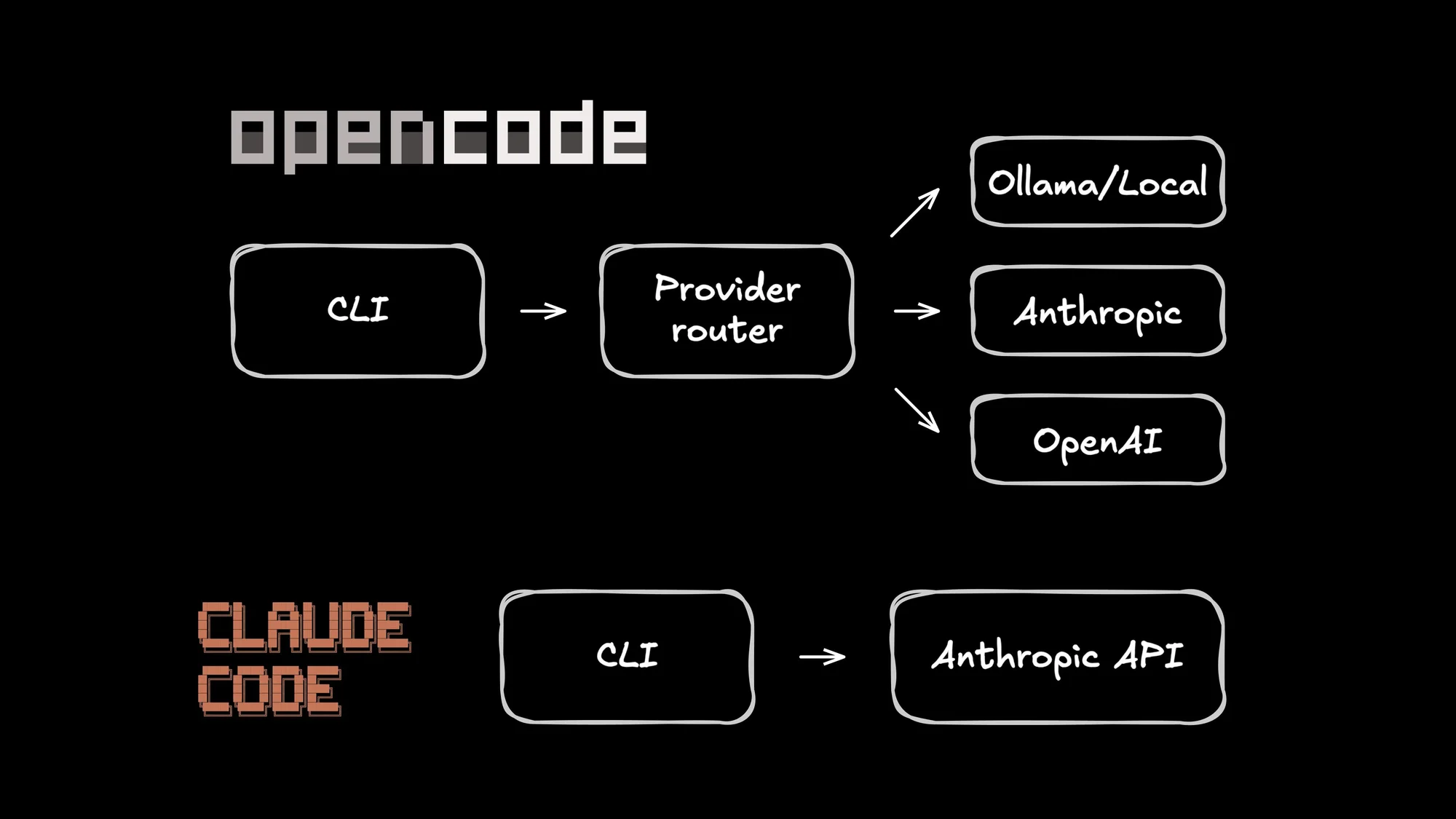
The killer feature is flexibility. In a best-case world, that also includes subscription economics: authenticate once, reuse the plan you already pay for, and skip the per-token anxiety.
But the latest drama (Anthropic appears to be scoping some OAuth credentials to Claude Code itself, breaking third-party clients) is a reminder that auth is policy, not physics. Providers can scope credentials to specific first-party clients. When that happens, third-party tools fall back to the boring, reliable path: API keys (or switching providers).
The trade-off is maturity. OpenCode ships fast, which means you might hit the occasional bug. But if you're willing to tolerate a few rough edges for the flexibility to run any model, it's a compelling option.
Feature comparison
| Dimension | Claude Code | OpenCode |
|---|---|---|
Source code | Proprietary | MIT open source |
Model support | Claude only | 75+ providers, Ollama |
Subscription auth | Native (Pro/Max) | Varies (Zen plans + BYOK. Some OAuth flows are in flux) |
Pricing | $20-200/mo or API | Free tool. Pay your provider |
Desktop/Web | Research preview | Desktop app (beta) |
IDE plugins | VS Code, JetBrains | VS Code |
Architecture | CLI tool | Client/server + HTTP API |
MCP config | Session toggling, lazy loading (experimental) | Per-agent glob patterns |
Local models | No (workarounds exist) | Yes (Ollama native) |
This architecture choice is a big deal. OpenCode's client/server design enables power features like running sessions in remote Docker containers. The SST team is actively building toward "Workspaces" that persist even when you close your laptop, a workflow that Claude Code's simpler CLI design can't support.
Practical comparison: Testing the same model in both tools
Marketing claims are great, but I care about what ships. So I ran a little experiment: both tools in a head-to-head cage match. To keep things fair, I used the exact same model (Claude Sonnet 4.5) and ran everything in fresh Docker containers to avoid any local configuration bias.
Methodology
- Repository: A medium-sized TypeScript/Node.js project with existing tests
- Model: Claude Sonnet 4.5 for both tools
- Environment: Fresh Docker containers with no prior configuration or history
- Evaluation: Task completion, time, permission prompts, diff quality, and failure recovery
The tasks
Task 1: Cross-file rename (the torture test). This is the one that breaks things. Refactoring global variables across multiple files is the ultimate litmus test for an AI agent. The prompt: "Find every definition and use of user_id in this codebase. Rename it to userId everywhere, following camelCase convention. Make sure the code still compiles."
Task 2: Bug fix. I love this one because it's so realistic. I hid a type error in the project to see if the tools could find and fix it without hand-holding. The prompt: "There's a type error in this project. Find it and fix it. Run the TypeScript compiler to verify."
Task 3: Refactor. Time to clean up some tech debt. I asked the models to take duplicated fuzzy-matching logic and abstract it into a shared helper. The prompt: "The suggestEnumValue and suggestFieldName functions share similar fuzzy matching logic. Extract the common pattern into a shared helper function."
Task 4: Test writing. The chore nobody wants to do. I pointed them at an untested module to see if they could mimic the existing test patterns. The prompt: "The validators.ts module has no tests. Write comprehensive unit tests for all exported functions using the existing test patterns."
Results
| Task | Claude Code | OpenCode | Winner |
|---|---|---|---|
Cross-file rename | Code renamed, comments preserved (3m 6s) | Everything renamed (3m 13s) | Depends |
Bug fix | Correct fix (41s) | Correct fix (40s) | Tie |
Refactor | Clean refactor (2m 10s) | Refactor + fixed unrelated type error (3m 16s) | Tie |
Test writing | 73 tests (3m 12s) | 94 tests (9m 11s) | OpenCode |
Total time | 9m 9s | 16m 20s | Claude Code |
Here's the takeaway: Claude Code is built for speed. OpenCode is built for thoroughness.
Rename task: To comment or not to comment
Both agents crushed the actual code renaming: variables, parameters, interfaces, the works. The builds passed immediately. The real difference showed up in how they treated the human-readable parts.
Claude Code took a nuanced approach. It preserved the JSDoc comments and explanatory text, noting that it kept them because they referenced the concept, not the specific variable name. It treated documentation as a separate layer from the code logic.
OpenCode went all in. It renamed everything, comments included. Where Claude left "Initialize the user context with the given user_id," OpenCode updated it to "Initialize the user context with the given userId."
So, who's right? Honestly, it depends on your team. If your comments serve as API documentation that gets parsed by other tools, OpenCode saved you a manual cleanup pass. If they're internal notes, preserving the original terms is clearer. The cool part is that neither tool "forgot" the files. They made different choices.
The test writing trade-off
At first glance, OpenCode looks sluggish here: nine minutes vs. Claude's three minutes. But if you look under the hood, you see exactly where that time went.
OpenCode ran pnpm install to ensure dependencies were fresh, then executed the entire test suite to guarantee no regressions. It wrote 94 test cases and confirmed they played nice with the existing 200+ tests.
Claude Code optimized for velocity. It wrote 73 tests, verified that those specific tests passed, and called it a day without running the full suite.
Both strategies have their place. Claude Code assumes a working baseline and sprints for the finish line. OpenCode assumes the world is chaos and verifies the whole system before signing off.
MCP and the context tax
Both tools support Model Context Protocol (MCP) to hook up external services like GitHub or Postgres. It's powerful, but nobody talks about the hidden cost: context pollution.
Why care about MCP context for AI agents
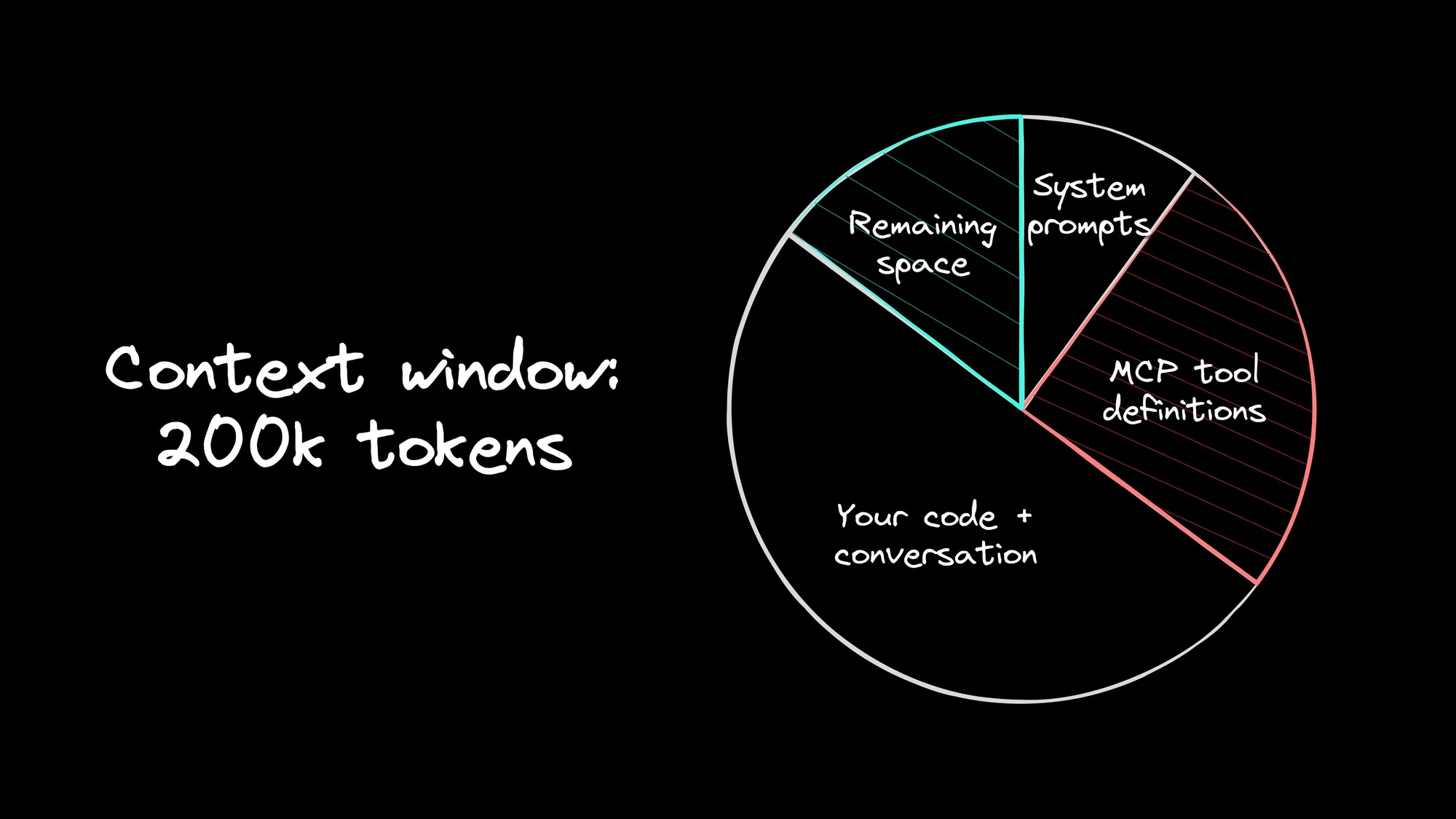
Here's the deal: when you enable an MCP server, it dumps every available tool definition into the model's context immediately. The GitHub server alone adds like 15 tools. A database server adds a dozen more.
In my testing, running seven active servers chewed through 25% of a 200k token window before I even typed a prompt. With Claude Opus 4.5 pricing, you're burning cash (about $1.25 per session) on tools you might not even touch.
How Claude Code handles MCP
Claude Code takes a manual approach. You add servers via the CLI (claude mcp add) and toggle them on or off with /mcp. If you want strict isolation, you're stuck juggling config files and flags.
There's one lifesaver: if you set ENABLE_EXPERIMENTAL_MCP_CLI=true, it lazy-loads tools instead of dumping them all in at once. That helps a ton with the overhead. But you still can't create persistent profiles for different tasks. And the feature is actively developing.
How OpenCode handles MCP
OpenCode treats tools more like dependencies in a package.json. You set them up in opencode.jsonc and use glob patterns to control who sees what.
This declarative style keeps the context clean. You can inject specific tools only into the agents that need them, instead of dumping the whole kitchen sink into every conversation.
The verdict
If you're connecting one or two things, either tool is fine. You won't notice the bloat. But if you're building a serious stack with GitHub, Sentry, and database access all at once? OpenCode's approach prevents the context window from getting out of hand.
Pricing
Let's be real: API costs are the silent killer of agentic workflows. When you let an LLM run loops on a complex refactor, the meter is spinning fast. A single day of heavy coding with a top-tier model like Claude Opus can burn $20 to $50. Do that every day, and you're staring at a $1,000 monthly bill.
If you're a VC-backed startup, that's fine. If you're a solo dev? That hurts.
Subscriptions change the math.
Subscription value
Anthropic's Max 20x plan costs $200 per month, but the math shows it provides roughly $2,600 worth of API credits. You're buying compute at a 90% discount.
This is where OpenCode used to shine the brightest: subscription OAuth. If you could authenticate once and reuse your $20-$200/mo plan everywhere, it nuked the per-token anxiety.
But that advantage can evaporate overnight. Lately, people have reported Anthropic returning an error like: "This credential is only authorized for use with Claude Code and can't be used for other API requests" when Claude Code-scoped credentials show up in third-party clients. Translation: if you want Claude in OpenCode reliably, assume you’ll be using API keys and paying API rates (or pick a different provider).
That said, OpenCode isn’t standing still. They launched OpenCode Black, a $200/month, “use any model” tier that’s a limited run.
Other options
Community plugins for ChatGPT Plus and Gemini Advanced exist, though these aren't officially supported yet.
Local models
Two reasons drive local model use: privacy and cost. Your code is compliance-locked and can't leave the building, or you want to opt out of per-token billing.
OpenCode with Ollama
OpenCode is great at this. Because it supports any OpenAI-compatible provider, you can spin up Ollama, point your config at localhost, and you're off to the races.
The reality check
But let's be real: your laptop isn't a data center. Physics still applies, and trade-offs come when you cut the cord.
- Tool calling is hit-or-miss. Smaller models often struggle to output clean JSON or figure out the right arguments. It works, but it can be flaky.
- Agents are hungry. Complex workflows eat context for breakfast. The default 8,000-token window on most local models is going to choke, so bump up
num_ctxin Ollama immediately. - It's going to be slower. Cloud inference feels instant. Local inference? Expect some fan noise and a sluggish startup.
Security and permissions
Let's be honest: giving an LLM access to your shell is like handing a toddler a power drill. It gets the job done fast, but you need to keep an eye on it.
Tools that can read files and run terminal commands are massive force multipliers, but they're also a liability if you aren't careful.
Claude Code's approach
Claude Code takes the "better safe than sorry" route. It defaults to read-only and asks for approval before it writes a file or runs a command. Yes, this adds friction, but that friction is the only thing standing between you and an accidental rm -rf.
I'm a big fan of Plan Mode. It locks the agent down so it can analyze your architecture and map out legacy code without the risk of breaking anything.
If you like living on the edge, there's a --dangerously-skip-permissions flag that turns off the safety net. I'd only run that in a throwaway container where I don't care if things go sideways. Anthropic is working on deeper sandboxing to make this smoother, but for now, the prompts are there for a reason.
OpenCode's approach
OpenCode leans on transparency. Because it's open source, your security team can audit the code. You've got total control over where it runs and what it touches.
The roadmap includes "Workspaces" that run sessions inside Docker or cloud sandboxes. While that's a convenience feature, the security side effect is huge: it keeps the agent isolated from your host OS.
Neither tool is perfectly secure in a vacuum. Claude gives you safety through software limits. OpenCode gives you safety through infrastructure control. Pick the one that fits your risk tolerance.
Getting started
Claude Code is easy to get running. Run npm install, and it handles authentication with your Anthropic account. If you're already on a Pro or Max plan, the CLI picks that up instantly. Plus, they've got official extensions for both VS Code and JetBrains. Here’s some more Claude Code tips and tricks.
OpenCode takes a slightly different approach. You install it via curl, and it guides you through choosing your provider. If one auth method stops working, you can swap providers or fall back to standard API keys. It also ships with a desktop app and a VS Code extension.
The gist? Claude Code gets you to "hello world" faster. OpenCode asks for a bit more setup upfront, but in exchange, you get total provider independence.
How to decide
Your tools should work for you, not the other way around. Here's how to pick your lane.
Stick with Claude Code if:
- You want that polished, official experience straight from Anthropic.
- You've got a Claude Pro or Max subscription and want to maximize it.
- Your security team needs a vendor name they recognize.
- Claude models already handle 100% of what you need.
- You prefer simplicity and want it to work.
Switch to OpenCode if:
- You prefer open-source software you can audit, fork, or modify.
- You need options: local models for privacy, or swapping providers to save cash.
- You're a power user who wants granular control over context limits and agent definitions.
- You need your authentication state to persist across different tools.
- You love to tinker and customize your dev environment.
Honestly, both are solid choices. It comes down to whether you prefer a well-manicured walled garden or a wide-open public park.
The blind spot
Here's the thing: terminal agents are fantastic at text. Scripts, configs, backend routes? They eat that stuff for breakfast. But they have zero clue what your app looks like. When you tell a CLI to "fix the mobile padding," it's guessing based on probability, not sight.
You can try to patch this with things like the Figma MCP server or Chrome DevTools MCP. And yeah, they can work, but they feel like duct tape. Even with screenshots and DOM inspection, the hard part is still provenance: reliably tracing a UI change back to the exact component and source line that produced it.
One way to solve that: make provenance a first-class feature, not a best-effort workflow. Builder instruments your app so the editor can trace a UI element back to the component and source line that produced it.
It connects to your GitHub repo and spins up a real dev server. From there, you get a Figma-like visual editor that works directly on your codebase. Drag a component, adjust spacing, tweak a color. You're not pushing pixels to a design file, you're editing source code. It reads your existing design tokens and components, so changes stay consistent with your system. When you're done, you get a minimal diff and a reviewable PR.
So, keep your terminal agent for the backend logic and tests, where text-based reasoning shines. But when you need to touch pixels and actually see the result, switch to a visual tool.
For a deeper comparison of how Builder stacks up against Claude Code, Gemini CLI, and other agentic IDEs, I wrote a separate roundup.
Conclusion
Claude Code and OpenCode are tackling the same problem from different angles. Claude brings the polish and that "it works" ecosystem vibe. OpenCode brings the flexibility and the open-source transparency developers love.
The sleeper feature is the cost/access strategy. Claude Code bundles Claude in a subscription that can be wildly cheaper than API rates. OpenCode gives you optionality: bring your own keys, switch providers, run local, or pay for a flat tier like OpenCode Black.
Just don’t anchor your whole workflow on the idea that any subscription OAuth flow will work forever. Provider policy changes are part of the game now.
So treat this like any other tool choice: run both on your real codebase. Your monorepo’s haunted dependency chain will teach you more in 30 minutes than any benchmark table.
And when you need to verify what frontends those agents are shipping to production, give Builder a try. It gives you the visual context that a terminal window struggles to provide.
